Key takeaways
- ✓Text extraction keeps the words and loses the layout. It gave 0 characters for both scans, every label on the claim form but not which box was marked, and the report's caption but not one bar of its chart.
- ✓Missing text mostly produced NOT FOUND, the safe failure (27 of the 60 text answers). The dangerous failure was text that was there but incomplete: "Was a police report filed?" got Yes and the contact method got Email in every run, while the marked boxes said No and Phone.
- ✓A table written one column at a time, with one blank cell, has 7 stock numbers for 8 products. Paired in order, every number from the blank row down slides up one row: monitor arms got 18 (the footrest's number) instead of 45, in all 3 runs.
- ✓Reading the page image, gpt-5.4-nano got 56 of 60 against 24 of 60 from the text, and gpt-5.4-mini got 60 of 60. The image costs about 11× the input tokens: per 1,000 questions, $0.03 with the text, $0.25 with the image, $0.92 with mini.
- ✓Scan sharpness trades tokens for accuracy: 4 of 18 right at 50 DPI (~343 tokens), 17 of 18 at 150 DPI (~2,648), and the project lead's name right only at 150. Route each page: clean digital text to extraction, scans, forms, charts and tricky tables to the image, and check the names and numbers that matter.
A PDF can reach a language model in two ways. Text extraction pulls the words out of the file and sends them as text: it's cheap, exact, and the usual first step of a document pipeline. Or you can render the page and send a page image, a picture of the page, to a model that can read images (a vision model, also called a multimodal model). The difference is the layout. Extraction keeps the words and loses everything that isn't a word: marked boxes, chart bars, which number sits in which row, and every word on a scan. The page image keeps all of that, and here cost about 11 times as many tokens.
The source is Lab 08 (Multimodal & Voice), script 02_documents_as_images.py: six documents generated by code, so every right answer is known (an invoice, a price list, a claim form with checkboxes, a report with a bar chart, and two scans that are pictures of paper with no text inside), its questions, its instruction and its grader. The replies were recorded for the video, three fresh runs per question, from gpt-5.4-nano reading the extracted text, gpt-5.4-nano reading the page image, and gpt-5.4-mini reading the page image. One of the lab's 21 questions is left out ("Which product has the fewest units in stock?" expects the Filing cabinet, but the page says a blank cell means back order, so the Office chair arguably has fewer), which leaves 20 questions and 60 answers per setup.
Two ways to hand over a page
| Way | How | Breaks on |
|---|---|---|
| Extract the text | Pull the text layer out of the PDF (PyMuPDF, pdfplumber); OCR first if there's no text layer | Scans (no text), checkboxes and marks (drawings, not text), charts (only the caption is text), tables stored in an odd order |
| Send the page image | Render the page and show the model the picture | Very small print at low resolution; about 10× the tokens |
Every question went out with the same instruction: "Answer the question from the document. Reply with the answer only. If the document doesn't contain the answer, reply NOT FOUND."
What extraction leaves out
Here's what PyMuPDF's get_text() gave for each document:
- Both scans: 0 characters. A scanner stores a picture, not text.
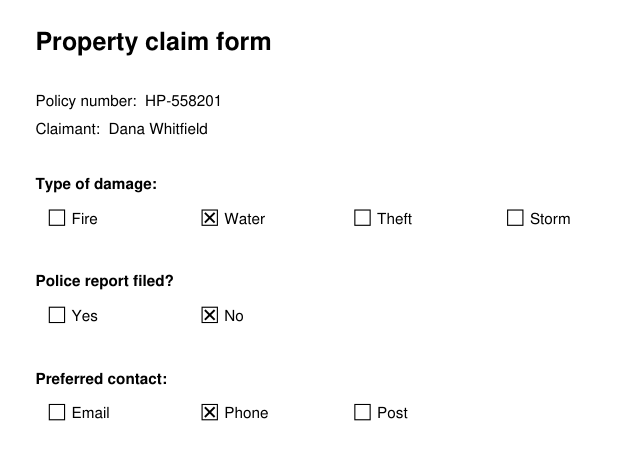
- The claim form: every word, no marks. "Type of damage: Fire Water Theft Storm", "Police report filed? Yes No", "Preferred contact: Email Phone Post". A box and the cross in it are drawn lines, so nothing in the text says which one is marked.
- The report: the caption, not the chart. "Figure 1: defect rate by month (% of units shipped)", and not one bar.
- The price list: every value, in column order. All the SKUs, then all the product names, then all the prices, then the stock numbers.
- The invoice: everything. Clean digital text in a simple table.
Pick a document to compare its extracted text with the page, then click any square to read that reply:
Input tokens per question: 109 with the text, 1,187 with the page image. Per 1,000 questions: $0.03 (text), $0.25 (nano, image), $0.92 (mini, image).
What text extraction gives (174 characters)
Property claim form
Policy number:  HP-558201
Claimant:  Dana Whitfield
Type of damage:
Fire
Water
Theft
Storm
Police report filed?
Yes
No
Preferred contact:
Email
Phone
Post
The page image (top of the page)
| Question | Right answer | Text | Image | Mini |
|---|---|---|---|---|
| What is the policy number? | HP-558201 | |||
| Which type of damage is checked? | Water | |||
| Was a police report filed? Reply Yes or No. | No | |||
| What is the preferred contact method? | Phone |
nano · extracted text · run 1 · 95 input tokens
Was a police report filed? Reply Yes or No. → Yes (wrong answer; the page says No)
Instruction sent with every question: “Answer the question from the document. Reply with the answer only. If the document doesn't contain the answer, reply NOT FOUND.”
Two ways to fail
When the answer isn't in the text, there are two ways the model can fail, and they're not equally bad.
NOT FOUND is the safe failure. On the scans, the chart questions and the damage type, the model followed its instruction: 27 of the 60 text answers. You know you don't know, so a fallback or a person can take over.
A confident wrong answer is the dangerous one. 9 of the 60, on three questions, the same answer in all 3 runs:
| Question | From the text | The page |
|---|---|---|
| Was a police report filed? | Yes | No |
| What is the preferred contact method? | Phone | |
| How many monitor arms are in stock? | 18 | 45 |
The instruction said to reply NOT FOUND when the answer isn't there. It didn't help, because the text looked like it held the answer: the right labels were all there. Note one pattern, an observation rather than a proven cause: both form answers are the first option listed in the text (Yes comes before No, Email comes first). Yet the third form question, which type of damage is marked, got NOT FOUND every run, not "Fire".
A wrong answer looks exactly like a right one, so it flows into the next step unnoticed. Count NOT FOUND and wrong answers separately when you test.
Every number there, still wrong
The price list is the sneakiest case, because nothing is missing from its text. The lab built it the way some reporting tools export PDFs: the table looks normal on the page, but the file stores it one column at a time. And one cell is blank: the Office chair is on back order.
A blank cell writes nothing. So the stock column comes out with 7 numbers for 8 products, and nothing in the text says which row is the blank one. Pair them up in order, and every number from the chair down lands one row too high:
The stock column, as extracted
The table was written one column at a time, so the text gives all 8 product names, then the stock numbers. The blank cell gives nothing at all:
7 numbers for 8 products.
| Product | Paired in order |
|---|---|
| Desk lamp | 140 |
| Office chair | 33 |
| Whiteboard | 7page: 33 |
| Filing cabinet | 21page: 7 |
| Paper shredder | 260page: 21 |
| Desk organizer | 45page: 260 |
| Monitor arm(asked) | 18page: 45 |
| Footrest | nothing leftpage: 18 |
From the Office chair down, every number lands one row too high. Asked how many monitor arms are in stock, nano read the text and answered 18 in all 3 runs: the Footrest's number. Pairing in order is the likely reason, not a proven one.
Pairing in order gives exactly the 18 the model answered in all 3 runs, which makes it the likely reason, though not a proven one. The text even contains the note "A blank stock cell means the item is on back order", and that didn't help either. Only the layout said which number belonged to which product, and extraction threw the layout away.
A cheap guard for this case: before trusting a table's text, check that every column has the same number of cells.
The scoreboard
Right answers out of 3 runs per question:
| Document | Questions | nano, extracted text | nano, page image | mini, page image |
|---|---|---|---|---|
| Invoice (digital PDF) | 4 | 12 / 12 | 12 / 12 | 12 / 12 |
| Price list (table, column order) | 3 | 6 / 9 | 9 / 9 | 9 / 9 |
| Claim form (checkboxes) | 4 | 3 / 12 | 12 / 12 | 12 / 12 |
| Report (chart) | 3 | 3 / 9 | 9 / 9 | 9 / 9 |
| Two scans | 6 | 0 / 18 | 14 / 18 | 18 / 18 |
| All | 20 | 24 / 60 | 56 / 60 | 60 / 60 |
The page image fixed every form, chart and price-list answer. All four of nano's misses were on the memo scan: the project lead's name, misspelled in all 3 runs ("Marcus Oyevaran", "Marcus OyeEaran", "Marcus Oyeoranan" for Oyelaran), and one finish date read as June 18 instead of July 18. The bigger gpt-5.4-mini got all 60.
What a page image costs
A model reads and bills in tokens, small chunks of a few characters each. A vision model cuts an image into patches and turns those into tokens too, billed as input next to the text. So more pixels cost more tokens. In the lab's first script, a chart cost 172 tokens at 512 pixels wide, 652 at 1,024 and 2,611 at 2,048, and nano's "detail" setting changed nothing: only the size did. Older models price images differently, so measure on yours.
| Setup | Input tokens per question | Per 1,000 questions |
|---|---|---|
| nano, extracted text | ~109 | $0.03 |
| nano, page image | ~1,187 | $0.25 |
| mini, page image | ~1,187 | $0.92 |
That's about 11× the input tokens on average. The text average includes the scans, whose text is empty; on the four pages that do have text, it's 136 against 1,174 tokens, about 8.6×. The prices are the lab's list prices. Either way it's small money per question, and large at volume.
How sharp a scan needs to be
Scans add one more dial: resolution, in dots per inch (DPI). The lab's scans so far were at 100 DPI. The script made both again at 50, 75 and 150 and asked the six scan questions three more times each:
The memo scan at 100 DPI, shown at the same width
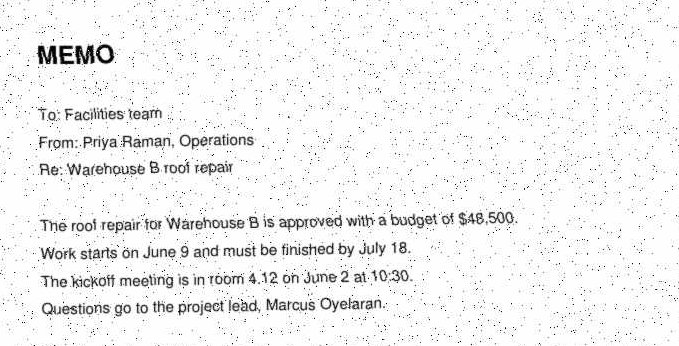
Cropped to the top of the page for display; the model got the whole page.
“Who is the project lead?” (Marcus Oyelaran), 3 runs: Marcus Oyevaran · Marcus Oveyran · Marcus Oyeran
All four settings
Bar: input tokens per question. Sharper scans cost more.
| DPI | Pixels | Right (of 18) | Input tokens per question |
|---|---|---|---|
| 50 | 435 × 558 | 4 | ~343 |
| 75 | 654 × 837 | 14 | ~721 |
| 100 | 870 × 1,116 | 14 | ~1,217 |
| 150 | 1,305 × 1,674 | 17 | ~2,648 |
Tokens roughly double with each step. At 50 DPI the print turned to mush: the budget came back as $849,500 or $94,500, and the lead's name as "Marcus O'Bryan" or close to it. The name was still wrong at 75 and 100 DPI, and right in all 3 runs only at 150, for about 8× the tokens of 50 DPI (2,648 / 343). The one miss at 150 was a NOT FOUND on a shipping rate.
Pick the lowest resolution that still reads your smallest print, and find it by measuring on a labelled sample of your own documents. Re-check when the model changes, because models cut images into tokens differently.
Choosing per page
There's no single right way; route each page:
| The page | Send | Why |
|---|---|---|
| Clean digital text, simple tables | Extracted text | The invoice was right 12 of 12 either way, for about a tenth of the tokens |
| No text layer (scans, photos, screenshots) | Page image | Extraction gives nothing |
| Checkboxes, signatures, stamps, charts | Page image | The answer is a drawing, not a word |
| Tables you can't trust (column order, blank cells) | Page image, or check the columns line up | The layout says which value belongs where |
| Names and numbers that matter | Check them | A bigger model (mini got 60 of 60), or read twice and compare |
"Read twice and compare" catches a misread that varies between reads, like the lead's name, which came back different in all 3 runs. It doesn't catch the text's Yes or 18, which were the same every time; for those, compare the text reading with the image reading. OCR (optical character recognition) gives a scan a text layer cheaply and locally, but it still drops marks and chart values and often the table structure, so it sits between the two.
Lab 08 covers more than this chapter. Script 01 asks the same question about charts: on eight questions about two chart images (one run each), nano got 6 of 8 and mini 8 of 8, while nano given the numbers as text got 5 of 8, its misses being counting and comparing mistakes, not reading ones. Scripts 03–04 search over images and scans (Chapter 27), script 05 measures speech-to-text (covered in the Voice AI track), and scripts 06–07 time a voice agent (Chapter 28).
Caveats
- Made-up documents, a best case. Every page was drawn by code, and the scans were made to look scanned (rotated, blurred, speckled, saved as low-quality JPEG). Real scans, handwriting and photos are messier.
- Small numbers. 20 questions, 3 runs each. The size of the gap (24 vs 56 of 60) is clear; small differences between setups wouldn't be.
- The lab's README shows its own single cached run (21 questions: 9, 20 and 21 right; ~113 text tokens; scans scored per question). This chapter uses the three fresh runs recorded for the video. Both point the same way.
- The "first option" pattern behind Yes and Email is an observation from two questions, not a tested cause. Likewise the column pairing explains 18 exactly but isn't proven to be what the model did.
- The 100-DPI row is a separate set of runs from the main scoreboard, on the same image. Both got 14 of 18 on the scans.
- Prices are the lab's list prices (nano $0.20 / $1.25, mini $0.75 / $4.50 per 1M input / output tokens). Check current pricing.
The checklist
- Look at what extraction gives you for each kind of page before building on it: scans, forms and charts often give nothing, or not the part you need.
- Route per page: clean digital text to extraction; scans, forms, charts and tricky tables to the page image.
- Score NOT FOUND and wrong answers separately. The wrong ones are the ones that hurt.
- Guard extracted tables: check every column has the same number of cells before pairing values with labels.
- Pick scan resolution by measuring: the lowest DPI that still reads your smallest print, on your own documents.
- Check the names and numbers that matter with a second, different reading: a bigger model, or the image against the text.
Practice: grade the readings
Write the lab's grader and sort the recorded replies into right, NOT FOUND and wrong (24, 27 and 9 from the text). Split the price list's real extracted text into columns, pair them in order to get the footrest's 18, and write the check that flags the short column. Then compute the cost per 1,000 questions from the recorded token counts, and pick the lowest scan resolution that reaches a target score.
Quiz
1.What does text extraction return for a scanned PDF?
2.The claim form's extracted text had every label: Yes, No, Email, Phone. Why couldn't the model tell which boxes were marked?
3.Why is a confident wrong answer worse than NOT FOUND?
4.The price list's text has every stock number, yet "How many monitor arms are in stock?" got 18 instead of 45. What's the likely reason?
5.Reading the page image costs about 11× the input tokens of the text. When is extraction still the better choice?
6.How should you pick the resolution for scans?
Check your understanding
Try each question before opening its answer.
What does text extraction keep, and what does it lose?
It keeps the words stored in the file and loses the layout and everything drawn: which box is marked, the bars of a chart, which number sits in which row, and every word of a scan (0 characters for both scans here).
Why did the claim form get confident wrong answers rather than NOT FOUND?
The text had every label, so it looked like it held the answer; it just didn't say which box was marked. The model answered Yes and Email in every run (the first option listed each time), while the page said No and Phone. The instruction to reply NOT FOUND didn't help.
How did the price list turn 45 monitor arms into 18?
The table was stored one column at a time, and the Office chair's stock cell is blank, so the text has 7 stock numbers for 8 products. Paired in order, every number from the chair down moves up one row, and the monitor arm gets the footrest's 18. That's the likely reason, and a column-length check would flag it.
How much better was the page image, and what did it cost?
nano went from 24 to 56 of 60, and mini got 60 of 60. The image used about 11× the input tokens (~1,187 vs ~109 per question): $0.25 per 1,000 questions against $0.03, and $0.92 with mini.
How do you choose a scan resolution?
Measure on a labelled sample and take the lowest DPI that still reads your smallest print. Here 50 DPI got 4 of 18 at ~343 tokens, and 150 DPI got 17 of 18 at ~2,648, the first setting to read the lead's name right.
When would you still extract the text?
On clean digital pages with plain text and simple tables: the invoice was right 12 of 12 either way, at about a tenth of the tokens. Extracted text is also exact and searchable. Send the image where the meaning lives in the layout or the pixels.
Next up: Chapter 27 searches an archive of scans and screenshots, where every page is read once, long before anyone asks a question.